

j.hexx
10 de julio de 2011
worth the 59.99 i spent on it! i use it with Reaper 3.76.
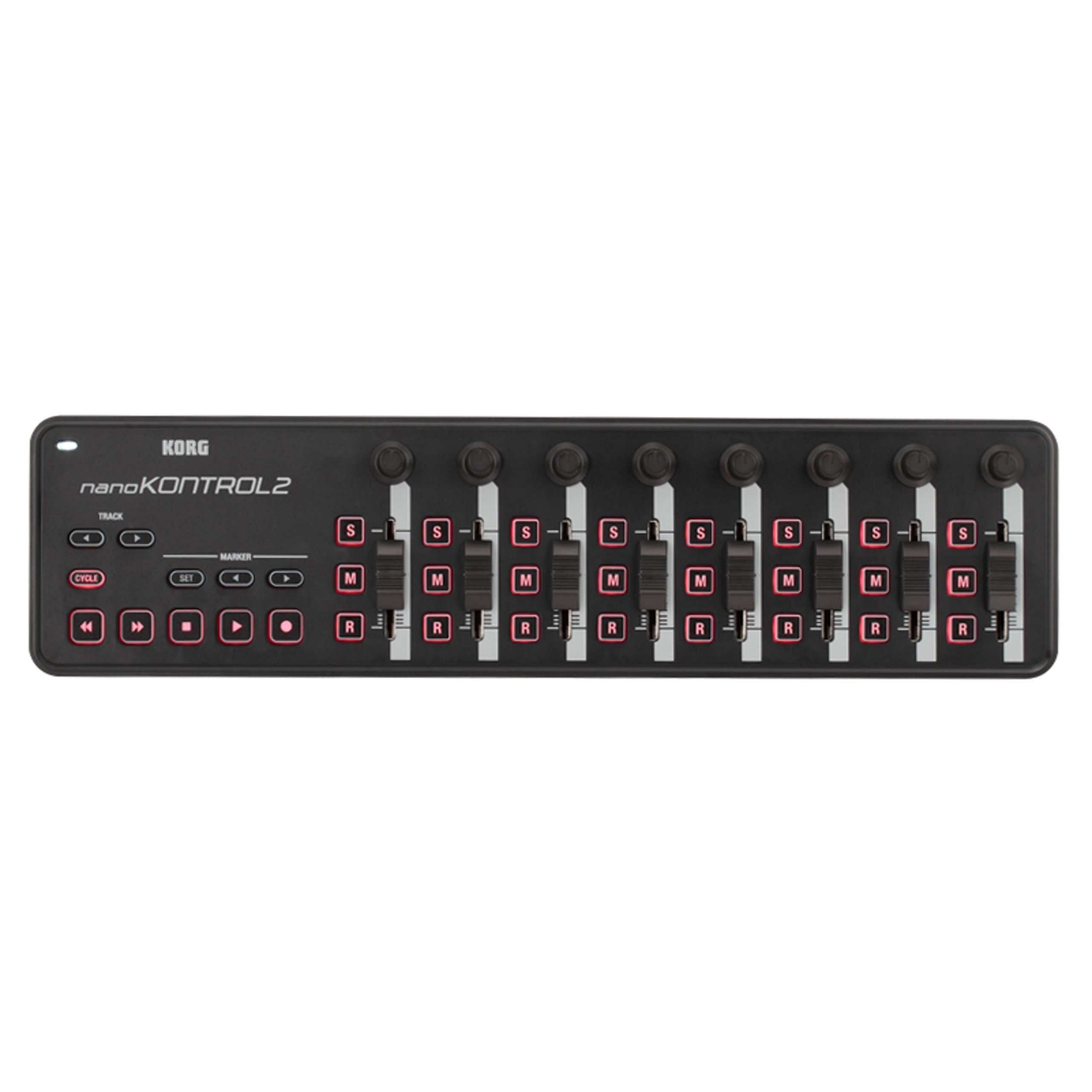
I recieved this in the mail 2 days ago, and i must say i am totally impressed with this unit. I programmed Reaper 3.76 using it's Midi CC message mode, and it took time using the action option in Reaper to manually program the NanoKontrol 2, to use it as the transport and mixer functions of the daw. Once i set it up (i got it programmed to 24 faders and pan knobs, plus all solo/mute/record arm buttons and the full transport as well using 3 out of 16 availiable midi channels! But if you like you can max it out at 8 tracks per midi channel, up to 16 midi channels giving you a max of 128 channels/tracks!) it worked smooth as butter. The pan knobs feel really good and not cheap, the faders have a nice feel of resistance to them like mixing boards do. The buttons light up when they are armed to toggle, i am very impressed with the quality of this unit.The pros to this unit is that it is definitely a step up in the construction and build quality of this unit compared to the version 1 of the NanoKontrol. The added transport functions are great , all the solo/mute/record arm buttons, as well as the transport buttons don't feel cheap at all, and feel solid which is a big surprise granted the cost of this unit (59.99 as of 7/3/2011). It has a decent weight to it, around 3/4 of a pound. It looks cool too during use in a session. The controls are very responsive with Reaper 3.76. I use this controller with it's Midi CC Message mode.The cons i have is that the scene button from version one was removed, and instead is now a part of the Korg Kontrol Editor, a program you get from the Korg website after you purchase the unit, and this program allows you to set the functions and switches, from monetary press to toggle mode, as well as set the seperate midi channels (midi channels 1-16) to switch between 8 sets of tracks(per one of the 16 midi channels you can select in the Korg Kontrol Editor) you program the NanoKontrol 2 to use. In order to switch between the midi channels, you must open the Korg Kontrol Editor and write the scene to the NanoKontrol 2 for every time you need to swtich between midi channels in your daw. The Korg Kontrol Editor doesn't take too long to load to make the changes to your NanoKontrol 2, so it isn't a big deal but some might have preferred the scene button on the device itself. But it doesn't bother me much so i like it as is.And if you have no idea how to program midi cc messages to your controller from your daw, it might frustrate a few folk who might see programming midi into a controller a bit frustrating at first. This was my first time ever programming any controller using midi cc messages from Reaper's built in Action Option window, and once i understood how it worked (took me from openeing the package and programming the actions for up to 24 tracks of faders/pan knobs/ solo,mute and record arm buttons, plus full transport controls took me about 2 hrs tops) it was so easy to program, and i got it after seeing how it worked!The second con is the version 1 of NanoKontrol had 9 faders instead of version 2's 8 faders. I wish they would have kept the 9th fader, due to the fact that the 9th fader could have been used as the master volume track and that would've been great. But for what i paid for it, and for what it is worth, i have to truly say the cons aren't so great to me, that it makes me regret my purchase. Matter of fact i will say that this is the best 60.00 i spent on a cheaper piece of gear and i would totally buy another one, that is how great this daw controller is.In short, it is worth your 60 dollars, it has a sturdier build than the first version, it has a nice feel and good resistance on the faders and pan knobs and all toggle switches feel durable and better quality than the cost of this unit. I would HIGHLY reccommend the NanoKontrol 2 usb/midi Daw controller for your home studio, and even pro studio use.Ver másVer menos
47 personas la encontraron útil